How to play Beat My Shed
By Memici LLC · Updated
Beat My Shed is a free browser party racing game where you build a wild hut, put it on legs and race it against friends. Play with 2–4 people in a room, or play a solo cup against the garden’s racers. No account or app download is needed.
Play Beat My Shed Set up a room
How do I play with friends?
Open Beat My Shed and choose Start a room. Share the room code with the people you want to play with. Each player opens the game on their own device, enters the code under Got a code? and chooses Join. A multiplayer room holds 2–4 racers; a separate shared screen can show the race.
- Start a room on one player’s phone or computer.
- Ask the other players to join using the room code or invitation.
- Wait until everyone is in the lobby, then start the cup.
- Build your hut in the workshop and get ready for the first race.
Keep the game tab open during your cup. Share codes only with people you know: anyone who receives or guesses a code may be able to join or watch. The host can lock the room and remove players. See privacy and room safety for more details.
What happens in a crafting cup?
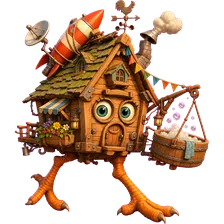
A crafting cup in Beat My Shed keeps one hut across three races. In the first workshop, choose a base, body, roof and legs, then pick an available trick. You can change its style and try the test run before you race. The workshop shows what each part does and which tricks your build can use, so read the choices before you press Ready.
After the first race, return to the workshop to adapt the same hut. You can swap up to two parts and copy an available trick a rival used; they keep their trick too. The last workshop gives you one more chance to refine your build before the final race. Look at the upcoming course when choosing changes: mud, ice, low bridges and wind pose different problems. The host can choose a relaxed pace in Room settings if your group wants more building time.
How do the race controls work?
Your hut runs along the course by itself. In the default hop-ring mode, press HOP as it runs through a glowing ring. Use your trick’s button when you want to activate it. When eggs are enabled, you have one egg per race to throw at an eligible hut ahead; the egg button shows its target. Watch for the incoming-egg warning and time a hop to dodge.
| Action | Touch control | Keyboard |
|---|---|---|
| Hop | HOP button | Space, or Enter when HOP is focused |
| Use your trick | The trick button | G |
| Throw an egg | EGG button, when available | E |
Space activates the focused egg or trick button when focus is on either of those buttons. The host can turn eggs off in Room settings. A cup ends after three races, with results and a podium.
Can we use a TV as the shared screen?
Yes. Open beatmyshed.com/tv in a browser on the screen you want everyone to watch. Choose Start a room here and have phones join with its code, or enter the code of a room already started on a phone. Players use their own devices to build and race; the shared screen shows the action.
A computer connected to a TV can provide the browser screen. TV browser capabilities vary. If the screen cannot draw the 3D garden, use a different browser or device for watching the race. You can also play without a separate TV.
Can I play on my own?
Yes. Choose Play on your own on the home screen for a whole cup against the garden’s racers. This lets you try building, racing and changing your hut before inviting friends. The game needs an internet connection to load; offline play is not supported.
What is free, and what does the Family Pack add?
Guest play, hut parts and gadgets are free. The three free courses are Bridge & Gale, Bog Bounce and Slip ’n’ Tip. The optional Family Pack adds Puddle Parade, Rooftop Rumble and Frosty Fairground to the host’s course selection. Each cup races three courses.
When the pack is available to buy, it is a one-time purchase for the adult host. Everyone in that host’s room can race its courses; guests do not need to buy it. It adds courses, not faster parts. The grown-up purchase screen shows the current offer and price. Read the refund and purchase help page before buying.
What do I need, and where can I get help?
Use a current browser with JavaScript enabled and an internet connection. WebGL displays the 3D garden. If your browser cannot draw it, buttons, clocks and results can still work, but use another compatible device to see the race. You do not need a player account.
Beat My Shed is provided by Memici LLC. For connection problems, purchase help or concerns about a room, email support@memici.com. Do not send card details or private reconnect tokens. You can read about the game and its terms of play before starting.